

Ok, I always forgot how to this from time to time and I think its time for me to write it down. It happens every time I change my default browser from IE to Firefox or to Chrome. So I usually turn off their annoying `please make me your default browser` dialog box. But each time I upgrade the browser to the latest version they suddenly asking that question again or worst…
Anyway… I don’t know how, but its affecting the default browser in my Visual Studio Web Development IDE too. So sometimes when I run a web apps from my Visual Studio, it would run on a different browser that I don’t want it to be run in. And trying to set it the default browser could takes minutes cause I always forgot how to do it… but actually it’s very easy.
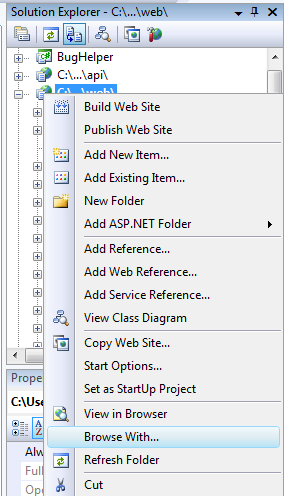
1. Right Click on the web site that you want set the default browser
2. Highlight the `Browse With…` menu and click it.
3. It would shown a dialog box like the one shown below.
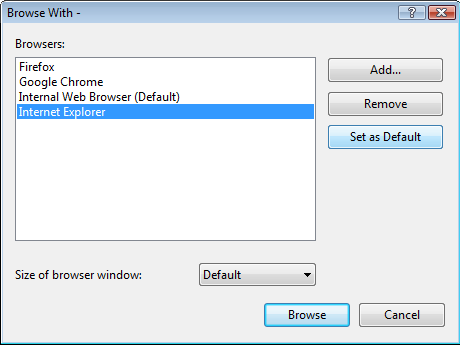
4. Choose your browser and click the `Set as Default` button.
5. Click `Cancel` button when you’re done.
That is, easy right… so easy that I always forgot about it *grin*
nyimak dulu…